
wpCareers (JobPortal Project) is a WordPress plugin
The plugin allows you to build an online jobs/resume website, where the applicants will be able to search, update, add/remove, and add or edit their resumes/profiles.
In addition, user can also add/delete/change descriptions, upload images/photos.
* In Admin Area the administrator will be able to:
* View and manage records in terms of add/modify/remove of entries
* Approve or deny the posts.
* Inactive Applicants Convert to Active
* Delete Users profile, Delete Employer profiles
It is a complete ready to use as Job Board System
IMPORTANT NOTE:
We strongly recommend you using themes that the front page will be displayed in one column otherwise you use our theme wpcareers.

jPortal Theme
Some themes, which are already modified to use for wpcareer plugin, placed below for downloading:
Sandy-Kornikova
 |  |  |
| Accordion Lite | Red City |
NOTE:
Some themes, which are arleady modifie by me to use in wpcareer plugin, are available HERE!
This plugin is under active development. If you experience problems, please first make sure you have installed the latest version. Feature requests, bug reports and comments can be submitted [here]
1) Click here to download the wpCareers last release
Installing the plugin
Please test the plugin with your theme on a develop machine or a local machine, if the test is successful then install it on the production machine.
1. Extract files
2. Upload ‘wpcareers/’ folder to your ‘./wp-content/plugins/’ directory
3. Login to the administration and go to “admin panel/plugins” and activate the plugin
4. Go to the “Manage” tab of your WP.
You have now there a new tab called “wpcareers” to configure the plugin.
You will need to make the following folders writeable (chmod 777) :
– wp-content/plugins/wpcareers/templates_c
– wp-content/plugins/wpcareers/cache
NEW in THE VERSION 1.1
Add a public directory and upload the resume and images resources (the public folder must have write permission)
– wp-content/public/wpcareers/resume
– wp-content/public/wpcareers/public
Screenshots
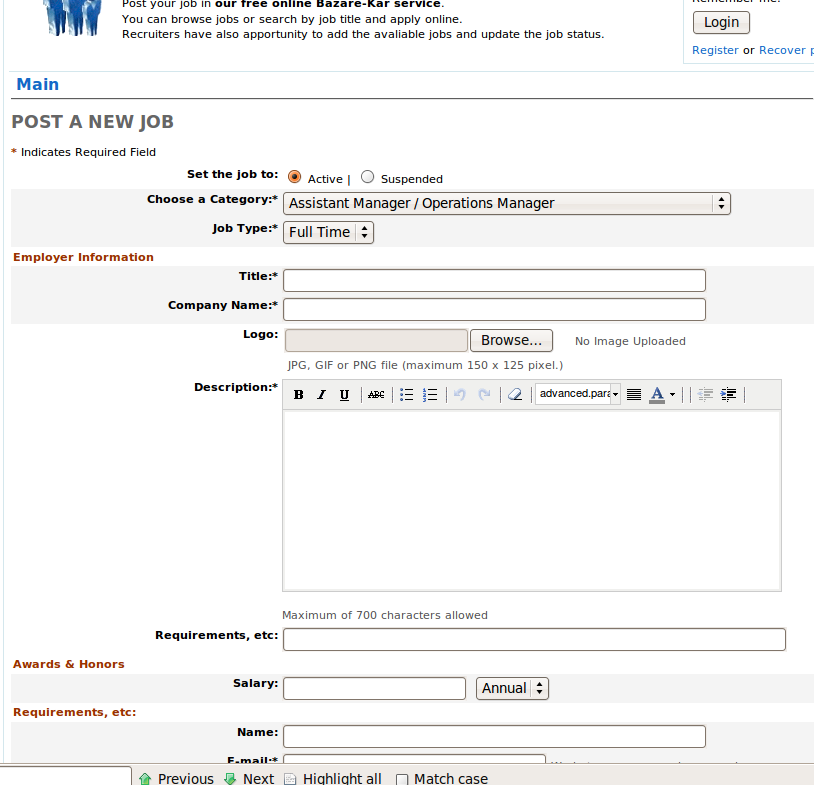
screenshot-1.png
screenshot-2.png
Demo link:
Questions and Examples of Use
Frequently Asked Questions
Todo:
Changelog:
Jan 18, 2010 – Released v1.1
– fixed for plugin auto-upgrade
an easy fix for the people having problems with resumes not posting.
look in jp_admin_setup.php for the following:
$wpca_sql[$table_prefix.’wpj_resume’] = “CREATE TABLE IF NOT EXISTS {$table_prefix}wpj_resume (
r_id int(11) NOT NULL auto_increment,
rc_id int(11) NULL,
r_name varchar(128) NOT NULL default ”,
r_title varchar(128) NOT NULL default ”,
r_status int(3) NOT NULL default,
r_exp int(3) NULL,
r_expire int(3) NULL,
r_private int(3) NULL,
r_tel varchar(32) NULL,
r_salary varchar(128) NULL,
r_contactinfo mediumtext NOT NULL default ”,
r_typesalary varchar(128) NOT NULL default ”,
r_date varchar(64) NULL,
r_email varchar(128) NOT NULL default ”,
r_submitter varchar(128) NOT NULL default ”,
r_desctext text NOT NULL default ”,
r_usid varchar(6) NOT NULL default ”,
r_town varchar(128) NULL,
r_state varchar(128) NULL,
r_valid varchar(11) NOT NULL default ”,
r_photo varchar(128) NULL,
r_resume varchar(128) NULL,
r_view int(5) NOT NULL default 0,
r_author_ip varchar(32) NOT NULL default ”,
r_startDate varchar(64) NULL,
r_fax varchar(32) NULL,
PRIMARY KEY (r_id)
) TYPE=MyISAM;”;
change the line:
r_status int(3) NOT NULL default,
to r_status int(3) NOT NULL default 0,
if that doesn’t work go to phpmyadmin >SQL query and paste the following:
CREATE TABLE wp_wpj_resume (
r_id int(11) NOT NULL auto_increment,
rc_id int(11) NULL,
r_name varchar(128) NOT NULL default ”,
r_title varchar(128) NOT NULL default ”,
r_status int(3) NOT NULL default 0,
r_exp int(3) NULL,
r_expire int(3) NULL,
r_private int(3) NULL,
r_tel varchar(32) NULL,
r_salary varchar(128) NULL,
r_contactinfo mediumtext NOT NULL default ”,
r_typesalary varchar(128) NOT NULL default ”,
r_date varchar(64) NULL,
r_email varchar(128) NOT NULL default ”,
r_submitter varchar(128) NOT NULL default ”,
r_desctext text NOT NULL default ”,
r_usid varchar(6) NOT NULL default ”,
r_town varchar(128) NULL,
r_state varchar(128) NULL,
r_valid varchar(11) NOT NULL default ”,
r_photo varchar(128) NULL,
r_resume varchar(128) NULL,
r_view int(5) NOT NULL default 0,
r_author_ip varchar(32) NOT NULL default ”,
r_startDate varchar(64) NULL,
r_fax varchar(32) NULL,
PRIMARY KEY (r_id)
) TYPE=MyISAM;
should fix it. Works for me :)
In advance congratulations to the team for the great work careers.
I ask you to add a condition to validate permissions deleted:
jp_post_job.php
jp_post_resume.php
For example without logging the following link to delete the job 1:
http://www.myweb.com/jobs?op=jdelete&id=1
Without logging the following link deleted resume 1:
http://www.myweb.com/jobs?op=rdelete&id=1
I have also noticed that deleting a resume delete a job, I’ve solved the case.
Change line 548 in jp_post_resume.php:
$ deleteResumeLinkForm = wpcareers_create_link (“jdeleteform”, array (“id” => $ id));
by:
$ deleteResumeLinkForm = wpcareers_create_link (“rdeleteform”, array (“id” => $ id));
*******************
FULLY CORRECT! THANKYOU!!!!
I just made changes in SVN
*******************
An example in the demo page to delete a job without logging:
http://www.wpcareers.com/wpcareers/?op=jdelete&id=8
sitemi dmoza kayıt edebilirmisiniz.
www.ikincielnotebooklaptop.com
Please give short code for wpcarrers plugin
Why wpcareers plugin to display two times in the page? Please expalin it.
<a href=”http://www.ikincielesyaalanlar.net/” title=”ikinciel eşya ” rel=”friend met”>dizi</a>
dmoz kaydı yapabilirmisiniz ?
me too….I just installed the plugin and changed default theme to wpcareer suggested theme. But it is display two times in a page. (all the content twice ). Its strange but I’m stuck now. Another problem is I’m not able to create catagories through admin panel, it says ‘ catagory is saved’ but no catagory is displayed in admin panel.
Guyz please reply, if anyone found a fix for this.
Thanks in advance…
Can you please assist with your plugin I have install on my site?
Cheers,
Tommy
Hani Bişi Yok Hala Eklememişsin
Given Below are the lines coming on top of the webpage Please help
Warning: include_once(/include/jp_rss.php) [function.include-once]: failed to open stream: No such file or directory in/home/sikhi137/public_html/sikhijobs.info/wp-content/plugins/wpcareers/jp_main.php on line 163Warning: include_once() [function.include]: Failed opening ‘/include/jp_rss.php’ for inclusion (include_path=’.:/usr/lib/php:/usr/local/lib/php’) in/home/sikhi137/public_html/sikhijobs.info/wp-content/plugins/wpcareers/jp_main.php on line 163
if that doesn’t work go to phpmyadmin >SQL query and paste the following:
CREATE TABLE wp_wpj_resume (
r_id INT(11) NOT NULL auto_increment,
rc_id INT(11) NULL,
r_name VARCHAR(128) NOT NULL default ”,
r_title VARCHAR(128) NOT NULL default ”,
r_status INT(3) NOT NULL default ‘0’,
r_exp INT(3) NULL,
r_expire INT(3) NULL,
r_private INT(3) NULL,
r_tel varchar(32) NULL,
r_salary varchar(128) NULL,
r_contactinfo mediumtext NOT NULL default ”,
r_typesalary varchar(128) NOT NULL default ”,
r_date varchar(64) NULL,
r_email varchar(128) NOT NULL default ”,
r_submitter varchar(128) NOT NULL default ”,
r_desctext text NOT NULL default ”,
r_usid varchar(6) NOT NULL default ”,
r_town varchar(128) NULL,
r_state varchar(128) NULL,
r_valid varchar(11) NOT NULL default ”,
r_photo varchar(128) NULL,
r_resume varchar(128) NULL,
r_view INT(5) NOT NULL default ‘0’,
r_author_ip varchar(32) NOT NULL default ”,
r_startDate varchar(64) NULL,
r_fax varchar(32) NULL,
PRIMARY KEY (r_id)
) ENGINE=MyISAM;
I am testing here before acquiring my new domain. A
Anyway, I have it installed I do not know how follow your instructions – I see no ftp in my wordpress admin. Sorry it I am being an idiot.
You will need to make the Smarty cache and template_c folders writable (chmod 777):
Use your FTP client to change its permissions to 777.
* odlinks/includes/Smarty/cache
* odlinks/includes/Smarty/templates_c
Once you have changed the folder permissions, return to your browser, and refresh it.
Now you can submit your settings. After submission installer will create the needed database tables automatically.
help
Attenzione : include_once (/ include / jp_rss.php) [ function.include-once ]: failed to open stream: No such file or directory in / home/sikhi137/public_html / sikhijobs.info / wp-content / plugins / wpcareers / jp_main.php on line 163 Warning : include_once () [ function.include ]:. Failed opening ‘/ include / jp_rss.php’ per l’inclusione (include_path = ‘:/ usr / lib / php :/ usr / local / lib / php ‘) in / home/sikhi137/public_html/sikhijobs.info/wp-content/plugins/wpcareers/jp_main.php on line 163
helpp no work :(
how can I fix this…. this message show in main:
Warning: include_once() [function.include-once]: Unable to access /include/jp_rss.php in /home/enegocio/public_html/wp-content/plugins/wpcareers/jp_main.php on line 163
Warning: include_once(/include/jp_rss.php) [function.include-once]: failed to open stream: No such file or directory in /home/enegocio/public_html/wp-content/plugins/wpcareers/jp_main.php on line 163
Warning: include_once() [function.include]: Failed opening ‘/include/jp_rss.php’ for inclusion (include_path=’.:/usr/lib/php:/usr/local/lib/php’) in /home/enegocio/public_html/wp-content/plugins/wpcareers/jp_main.php on line 163
Fix error in jp_rss.php for wpcareers in WordPress 4.0:
change in file “jp_rss.php”, locate the part
ob_start();
$pageinfo = $wpcareers->get_pageinfo();
and add the following line in between that two lines:
global $wpcareers;
so your final code will look like this:
ob_start();
global $wpcareers;
$pageinfo = $wpcareers->get_pageinfo();
*****************
Hi, Thank you for the bug report. I fixed the bug in SVN.
and you are done.
Warning: include_once() [function.include]: Failed opening ‘/include/jp_rss.php’ for inclusion (include_path=’.:/usr/lib/php:/usr/local/lib/php’) in /home/a5288471/public_html/wp-content/plugins/wpcareers/jp_main.php on line 163
plz send solution on my mail id
Good afternoon, I’m not sure there is time for I am in Brazil, I installed the plugin on the site wpcareers I’m riding ams gave an error on the main page of choices to post the resume or publish the announcement of jobs, it is doubling the form where there are two, one on top of another, I have done everything installed and reinstalled the plugin however this error always appears, someone could give me a light on the subject because I am new committing this type of work.
Thank you.
***
Hi, please edit the file:
wpcareers/jp_main.php round line 163 and
//include_once ( $wpcareers->plugin_dir . ‘/include/jp_rss.php’);
comment out the line the above.
*******
After I create a page, how to I add or implement the plugin? Please explain. Thanks.
Good Plugin for job posting websites..